The Invoices record form stores key information about a particular bill which has been generated. The invoice record will most likely have been created from a Billing Agreement, but can also be created independently of an agreement when needed.
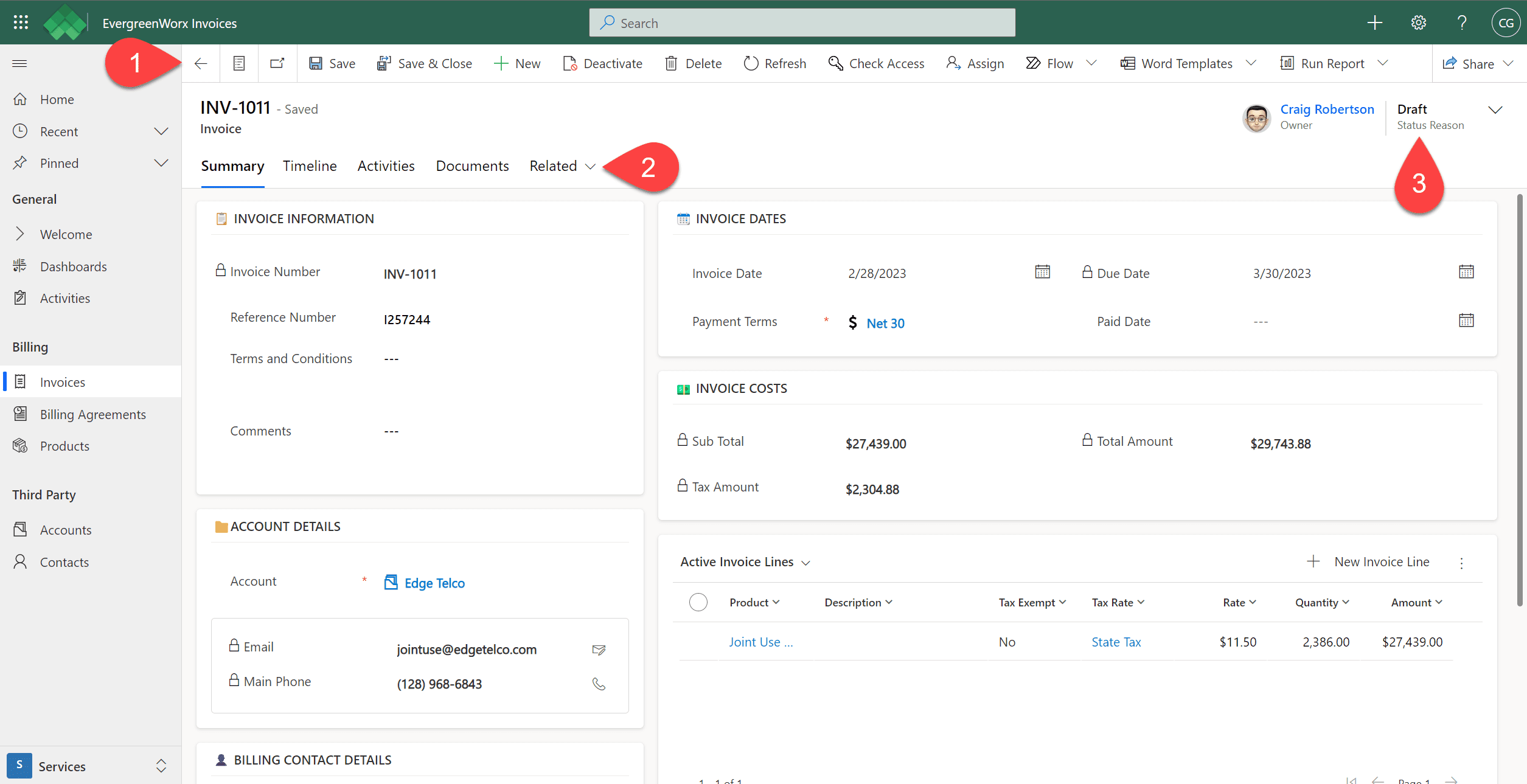
 In the ribbon, available actions are displayed for the current Invoice record, such as deactivating the record, deleting the record, or assigning the invoice to another person. The actions available depend on your security role and permissions.
 Record forms have tabs that allow the user to move between different data elements of the record. On the Invoice record, you’ll see the following tabs:
- Summary – Displays billing data such as the invoice details, the account, the amount of the invoice, and the relevant dates for the invoice.
- Invoice Lines can be created with either a Product or a Description. This allows users to create ad-hoc lines even if there is no Product in the application for the item they are billing for. They can simply provide a description with no product selection.
- Timeline – Stores historical notes and activities against the record. For more information, see Timeline | EvergreenWorx.
- Activities – Displays various communications associated with the establishment or management of the Invoice. For more information, see Activities | EvergreenWorx.
- Related – Other related items, such as Record Audit History.
 Status of the record shows the progress or completion of an active Invoice, including Draft, Sent, Paid, or Cancelled.